
Your Internet circuit at a branch goes dark. The interface stays up, because the modem is still plugged in. The routing protocol hasn't noticed either. Traffic keeps flowing into a tunnel that goes nowhere. How long until the edge moves it?
In Cisco SD-WAN, a few seconds. That's BFD's job. And BFD does a second job most people miss: it measures loss, latency and jitter on every tunnel, which is what application-aware routing uses to pick a path. This post covers both jobs, then breaks a link in a live overlay and times the reaction. I built the overlay in my home lab on Cisco Catalyst SD-WAN 20.18.2.1, with C8000v routers on IOS XE 17.18.02.
Cisco Catalyst SD-WAN 20.18.2.1 with C8000v edges on IOS XE 17.18.02, built in my home lab. Part of the Cisco SD-WAN series; old names such as vManage and vSmart are in the name map. Scope: timer defaults and bucket counts come from Cisco's docs; the failover timing comes from the lab.
The problem: a tunnel can be dead while everything looks up
An IPsec tunnel has no carrier signal. The interface on each end is up. OMP still has the TLOCs, because the Controller can still reach both edges over another path. Nothing local tells the edge that packets on this one tunnel are being dropped somewhere in the middle.
And "up" isn't enough anyway. A tunnel losing 5% of its packets is up, but you don't want voice on it.
How BFD works in SD-WAN
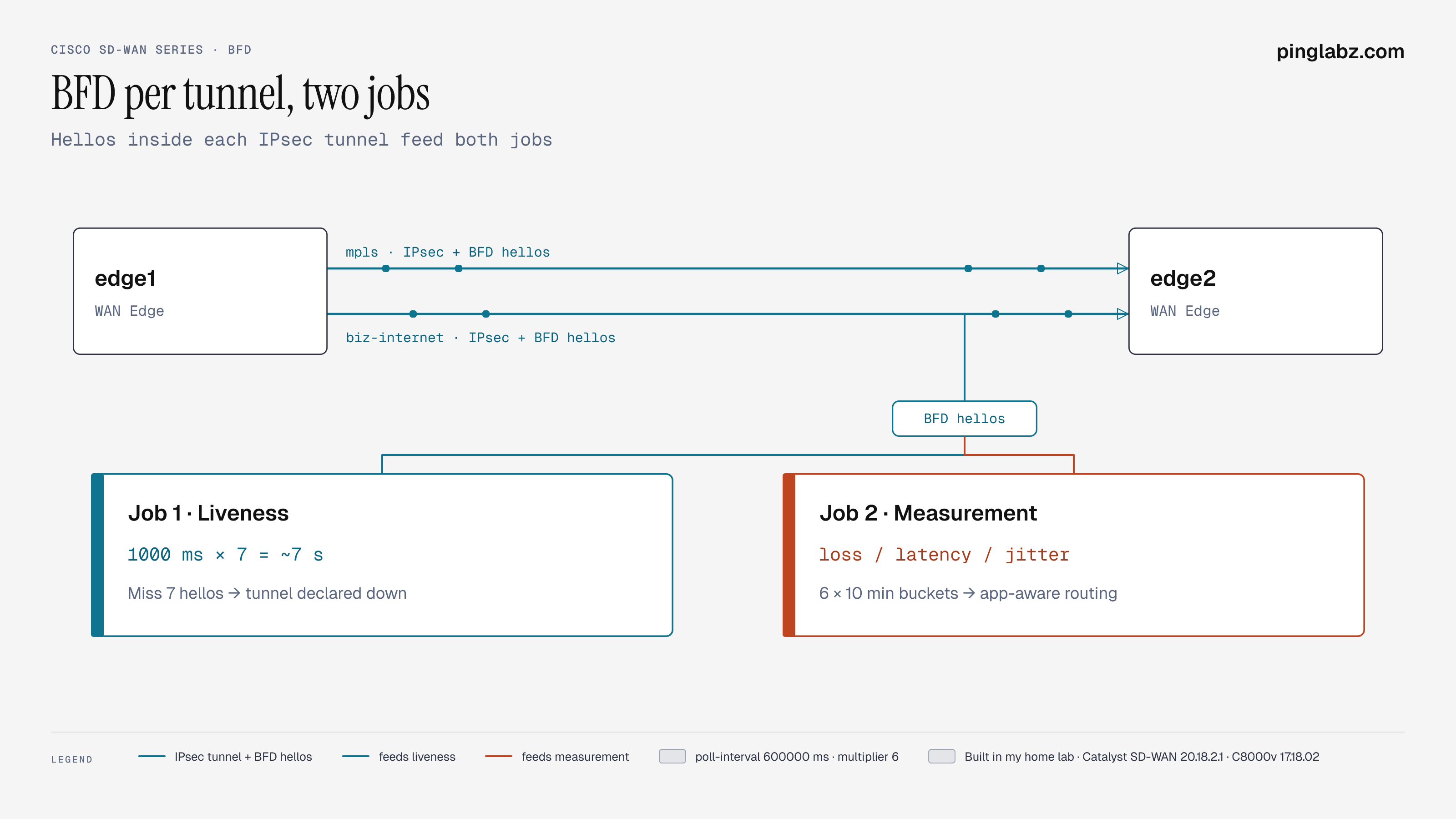
BFD runs one session per tunnel. Each edge sends a small hello down every tunnel, every second by default. Miss enough in a row and the tunnel is declared down. Meanwhile, every hello is timed and counted, which gives loss, latency and jitter.
The parts
One session per tunnel
There's no BFD config to write per neighbor. Every tunnel an edge builds gets a BFD session automatically. Two edges with two colors each, restricted to same-color tunnels, give two sessions (columns trimmed):
edge1#show sdwan bfd sessions
SYSTEM IP  STATE  SOURCE COLOR  REMOTE COLOR  DST PUBLIC IP  PORT   DETECT MULT  TX INTERVAL(msec)
10.0.0.2   up     mpls          mpls          10.10.2.12     12426  7            1000
10.0.0.2   up     biz-internet  biz-internet  10.20.2.12     12426  7            1000
The hellos go inside the IPsec tunnel, so they test the same path the data takes. That's why the colors and restrict setting directly changes the BFD session count.
Job 1: liveness
Two numbers decide when a tunnel dies:
- Hello interval: 1000 ms here.
- Multiplier: 7 here.
Miss 7 hellos in a row and the session goes down. So detection takes about 7 seconds. Cisco's docs give these as the defaults, and you can change them per color.
When the session drops, the edge stops using that tunnel for forwarding and moves traffic to whatever is left.
Job 2: measurement
The same hellos feed application-aware routing. The edge averages them over a poll interval:
edge1#show sdwan bfd summary
sessions-total           2
sessions-up              2
sessions-max             2
sessions-flap            0
poll-interval            600000
poll-interval is 600000 ms, or 10 minutes. Here's what that produces:
edge1#show sdwan app-route stats summary
app-route statistics 10.10.1.11 10.10.2.12 ipsec 12406 12426
 local-color              mpls
 remote-color             mpls
 mean-loss    0.000
 mean-latency 2
 mean-jitter  1
INDEX  TOTAL PACKETS  LOSS  AVERAGE LATENCY  AVERAGE JITTER
0      644            0     2                2
1      655            0     2                0
2      653            0     2                1
3      648            0     2                1
4      650            0     2                1
5      654            0     1                1
Six buckets, about 650 packets each. At one hello a second, 650 packets is roughly ten minutes, one poll interval per bucket. The mean values are what an SLA class gets compared against. According to Cisco's docs, the number of buckets kept is the app-route multiplier, 6 by default.
Notice the trade-off. Liveness reacts in seconds. The quality numbers move slowly, over a window of up to an hour. That's on purpose: you don't want traffic bouncing between paths on every small spike.
Path MTU
BFD also probes the path MTU of each tunnel:
edge1#show sdwan tunnel statistics bfd
tunnel stats ipsec 10.10.1.11 10.10.2.12 12406 12426
 bfd-echo-tx-pkts   93358
 bfd-echo-rx-pkts   93357
 bfd-pmtu-tx-pkts   803
 bfd-pmtu-rx-pkts   803
Echo packets are the hellos. PMTU packets are separate, much rarer probes that find the largest packet the tunnel can carry.
The lab: break a link and time it
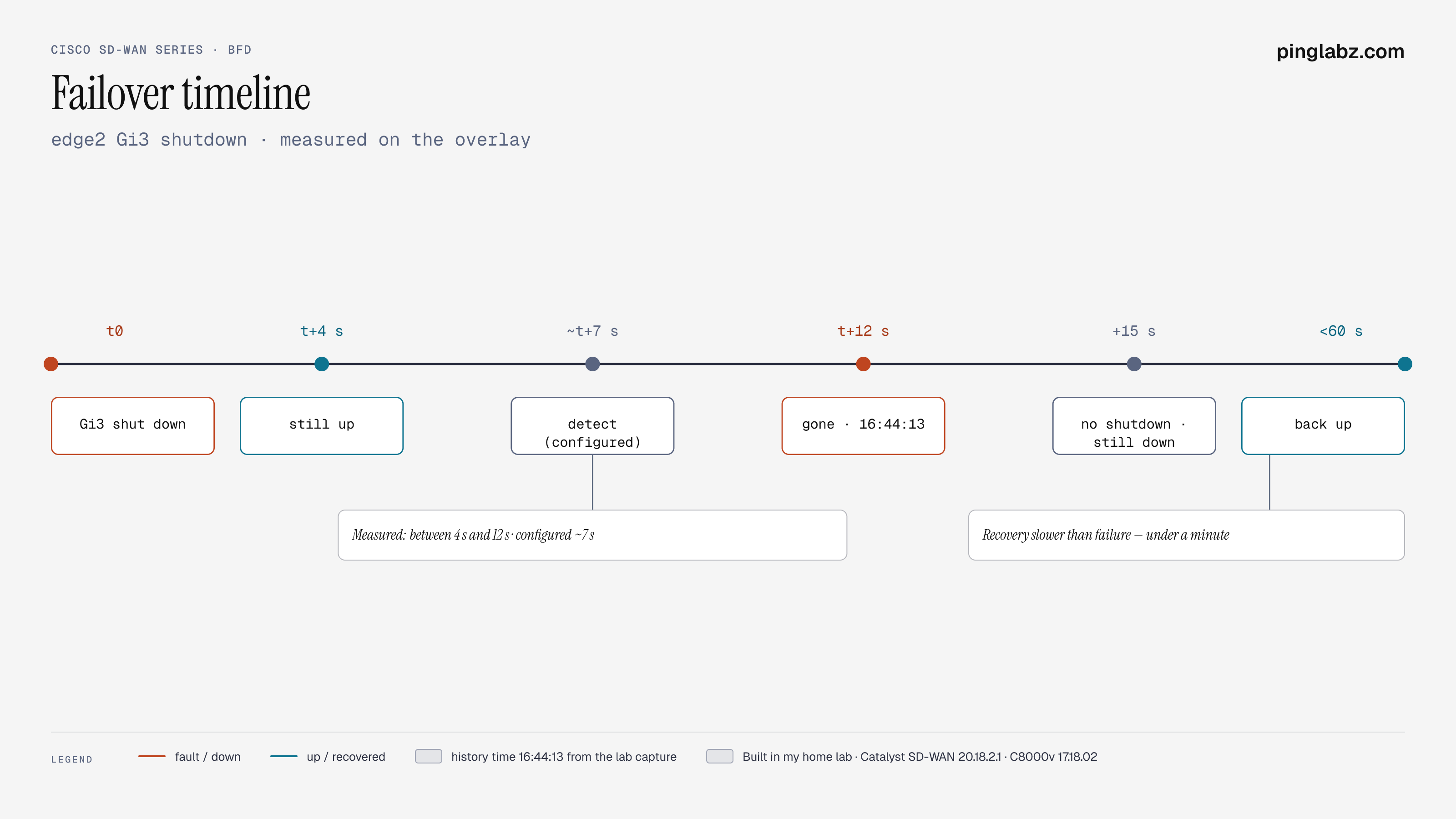
I shut GigabitEthernet3, the biz-internet interface, on edge2. edge1 knows nothing about that. Its own Gi3 stays up. Only BFD can tell it.
I polled edge1 four seconds after the shutdown, then twelve:
(after 4 s)
10.0.0.2   up     mpls          mpls
10.0.0.2   up     biz-internet  biz-internet

(after 12 s)
10.0.0.2   up     mpls          mpls
At four seconds edge1 still thought the biz-internet tunnel was fine. By twelve it was gone. show sdwan bfd history logged the exact moment:
SYSTEM IP  COLOR         STATE  DST PUBLIC IP  TIME
10.0.0.2   biz-internet  down   10.20.2.12     11/05/26 16:44:13
That fits a 7-second detect time. My polls weren't fine-grained enough to time it to the second, so take "between 4 and 12 seconds" as the measured result and 7 seconds as the configured one.
Then I brought Gi3 back up. Recovery was slower than failure. Fifteen seconds after no shutdown the session was still down. Within a minute it was back:
edge1#show sdwan bfd summary
sessions-total           2
sessions-up              2
My reading is that coming back takes more than BFD hellos. edge2's interface has to come up, and its control connections and TLOC on that color most likely have to come back before the tunnel forms again. I didn't trace each step, so treat that as an explanation, not a measurement.
Verify BFD on your own edges
| Check | Command |
|---|---|
| Sessions, timers, uptime | show sdwan bfd sessions |
| Totals, flaps, poll interval | show sdwan bfd summary |
| Up and down events with times | show sdwan bfd history |
| Sessions per local interface | show sdwan bfd tloc-summary-list |
| Loss, latency, jitter per tunnel | show sdwan app-route stats summary |
| Echo and PMTU packet counters | show sdwan tunnel statistics bfd |
FAQ
Do I need to configure BFD in Cisco SD-WAN? No. Every tunnel gets a session automatically. You only tune timers, per color, if you need different detection times.
What are the default BFD timers? A 1000 ms hello interval and a multiplier of 7, per Cisco's docs. This lab ran those defaults.
What does poll-interval 600000 mean? Application-aware routing averages BFD results over 10-minute windows. Cisco's default keeps 6 of those buckets.
Why did recovery take longer than failure? The far-end interface, its control connections, and its TLOC most likely have to come back before the tunnel forms. Each step was not traced individually.
What breaks
- No BFD session at all. No tunnel was built. Check TLOCs in OMP, restrict, and policy before BFD itself.
- Session stuck down with control connections up. The edges reach the controllers but not each other. Look at NAT, firewalls on the IPsec ports, or a color pair with no path between them.
- Flapping. A lossy link crossing the 7-miss threshold now and then. The
sessions-flapcounter andshow sdwan bfd historyshow it. - Timers too aggressive. Cisco's docs warn that lowering the hello interval on many tunnels costs CPU. Change timers per color, and only where you need faster failover.
- SLA reacts slowly. That's the poll interval and multiplier, not BFD. Shortening them makes app-route more jumpy.
Key takeaways
- Every SD-WAN tunnel gets a BFD session automatically, inside the IPsec tunnel.
- Liveness: 1000 ms hellos and multiplier 7 give about 7 seconds. This lab detected a far-end shutdown within 12 seconds.
- Measurement: the same hellos give loss, latency, and jitter in 10-minute buckets for application-aware routing.
- Failure is fast and recovery is slower, up to a minute here, because the tunnel has to rebuild through the control plane.
Previous: Control connections explained · Next: Cisco SD-WAN lab options in 2026 · Series hub: Cisco SD-WAN series