Configuring an eBGP neighbor is the first hands-on step in any BGP deployment. Unlike IGPs where neighbor discovery is automatic, every BGP peering session must be explicitly defined on both sides. A single mismatch — wrong IP, wrong ASN, missing route — and the session stays down with no helpful error unless you know where to look.
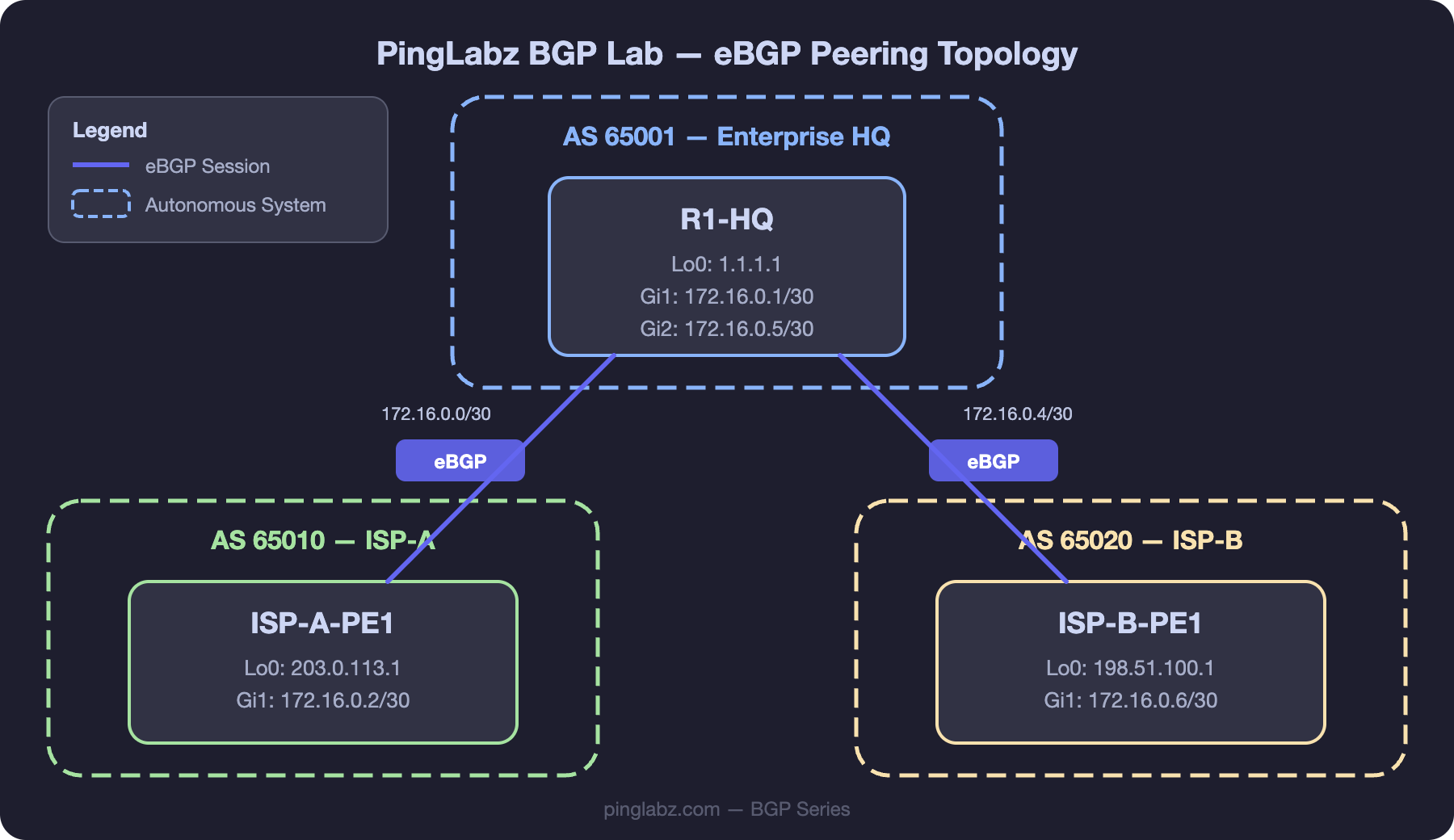
We'll configure eBGP peering in our PingLabz BGP Lab between R1-HQ (AS 65001) and ISP-A-PE1 (AS 65010), then extend to ISP-B-PE1 (AS 65020) for a dual-homed setup.
Lab Topology Reminder
- R1-HQ: AS 65001, Lo0: 1.1.1.1, Gi0/0: 172.16.0.1/30 (to ISP-A), Gi0/1: 172.16.0.5/30 (to ISP-B)
- ISP-A-PE1: AS 65010, Lo0: 203.0.113.1, Gi0/0: 172.16.0.2/30 (to R1-HQ)
- ISP-B-PE1: AS 65020, Lo0: 198.51.100.1, Gi0/0: 172.16.0.6/30 (to R1-HQ)
Basic eBGP Configuration
On R1-HQ, configure peering with ISP-A:
R1-HQ(config)# router bgp 65001
R1-HQ(config-router)# bgp router-id 1.1.1.1
R1-HQ(config-router)# neighbor 172.16.0.2 remote-as 65010
R1-HQ(config-router)# neighbor 172.16.0.2 description ISP-A-PE1
R1-HQ(config-router)# network 10.1.0.0 mask 255.255.0.0
On ISP-A-PE1, the mirror configuration:
ISP-A-PE1(config)# router bgp 65010
ISP-A-PE1(config-router)# bgp router-id 203.0.113.1
ISP-A-PE1(config-router)# neighbor 172.16.0.1 remote-as 65001
ISP-A-PE1(config-router)# neighbor 172.16.0.1 description R1-HQ
ISP-A-PE1(config-router)# network 100.64.0.0 mask 255.255.0.0
Key points:
remote-as 65010— because ISP-A is in a different AS, this creates an eBGP session.- The neighbor IP (172.16.0.2) must be the directly connected interface IP of the peer — eBGP defaults to TTL 1.
bgp router-id— explicitly set the router ID rather than relying on the highest loopback. Prevents surprises if loopbacks change.description— always label your peers. When you have 20+ neighbors, descriptions save time.
Adding the Second ISP (Dual-Homed)
R1-HQ(config-router)# neighbor 172.16.0.6 remote-as 65020
R1-HQ(config-router)# neighbor 172.16.0.6 description ISP-B-PE1
R1-HQ now has two eBGP peers. Both ISPs will send their routes, and BGP best path selection determines which path is preferred for each prefix. By default, with no policy applied, the shorter AS-path wins (step 4) — if both ISPs advertise the same prefix, the one with fewer AS hops is selected.
eBGP Multihop
Sometimes you need to peer with a router that isn't directly connected — for example, peering with an IXP route server or a loopback-based eBGP session for redundancy. Default eBGP TTL is 1, so multihop must be explicitly enabled:
R1-HQ(config-router)# neighbor 192.0.2.1 remote-as 64512
R1-HQ(config-router)# neighbor 192.0.2.1 ebgp-multihop 3
R1-HQ(config-router)# neighbor 192.0.2.1 update-source Loopback0
R1-HQ(config-router)# neighbor 192.0.2.1 description IXP-Route-Server
The value after ebgp-multihop is the maximum TTL. Set it to the actual number of hops plus a small buffer — don't set it to 255 unless you have a good reason (it weakens the TTL-based security that eBGP provides).
When peering via loopbacks, you need update-source Loopback0 so BGP uses the loopback as the TCP source address. You also need a route to the peer's loopback — typically a static route pointing to the directly connected next-hop.
BGP Authentication
In production, always authenticate eBGP sessions to prevent unauthorized peers:
R1-HQ(config-router)# neighbor 172.16.0.2 password Str0ngP@ss!Both sides must have the same password. This enables TCP MD5 authentication (RFC 2385). The password is sent as a hash — not cleartext — but MD5 is considered weak by modern standards. For stronger authentication, IOS XE supports TCP-AO (Authentication Option) on newer platforms — covered in BGP Session Authentication: MD5 and TCP-AO.
Timers
Default eBGP timers are keepalive 60 seconds, hold time 180 seconds. For faster failover:
R1-HQ(config-router)# neighbor 172.16.0.2 timers 10 30This sets keepalive to 10 seconds and hold time to 30 seconds. The lower hold time from either side is negotiated during the OPEN exchange. For sub-second failover, use BFD instead of aggressive timers — see BGP Convergence.
Verification
R1-HQ# show ip bgp summary
BGP router identifier 1.1.1.1, local AS number 65001
BGP table version is 12, main routing table version 12
6 network entries using 1488 bytes of memory
8 path entries using 1024 bytes of memory

Neighbor        V   AS   MsgRcvd MsgSent   TblVer  InQ OutQ Up/Down  State/PfxRcd
172.16.0.2      4   65010     142     138       12    0    0 02:15:33        4
172.16.0.6      4   65020      98      96       12    0    0 01:32:17        3
R1-HQ# show ip bgp neighbors 172.16.0.2
BGP neighbor is 172.16.0.2, remote AS 65010, external link
Description: ISP-A-PE1
BGP version 4, remote router ID 203.0.113.1
BGP state = Established, up for 02:15:33
Last read 00:00:14, last write 00:00:22, hold time is 180, keepalive interval is 60 seconds
Neighbor sessions:
1 active, is not multisession capable (disabled)
Neighbor capabilities:
Route refresh: advertised and received(new)
Four-octets ASN Capability: advertised and received
Address family IPv4 Unicast: advertised and received
Enhanced Refresh Capability: advertised and received
Message statistics:
InQ depth is 0
OutQ depth is 0
Sent Rcvd
Opens: 2 2
Notifications: 0 0
Updates: 12 18
Keepalives: 124 122
Route Refresh: 0 0
Total: 138 142R1-HQ# show ip bgp
BGP table version is 12, local router ID is 1.1.1.1
Status codes: s suppressed, d damped, h history, * valid, > best, i - internal
Origin codes: i - IGP, e - EGP, ? - incomplete
Network Next Hop Metric LocPrf Weight Path
*> 10.1.0.0/16 0.0.0.0 0 32768 i
*> 100.64.0.0/18 172.16.0.2 0 0 65010 i
* 100.64.0.0/18 172.16.0.6 0 65020 65010 i
*> 100.64.64.0/18 172.16.0.2 0 0 65010 i
*> 100.64.128.0/18 172.16.0.6 0 0 65020 i
*> 100.64.192.0/18 172.16.0.6 0 0 65020 iTroubleshooting
| Symptom | Cause | Fix |
|---|---|---|
| Peer stuck in Active state | TCP connection failing — wrong IP, ACL blocking TCP/179, interface down, no route to peer | Verify ping to peer IP, check ACLs with show access-lists, verify interface status. Ensure both sides have matching neighbor IPs. |
| Peer stuck in OpenSent | TCP connects but OPEN message is rejected — usually AS number mismatch | Verify remote-as matches the actual AS configured on the peer. Check show ip bgp neighbors [ip] for NOTIFICATION messages. |
| Session flapping (up/down repeatedly) | Hold timer expiring due to congestion, MTU issues, or CPU overload | Check show ip bgp neighbors [ip] | include hold for timer status. Look for MTU issues on the transit link. Consider BFD for fast detection. |
| Session up but no routes received | Peer not advertising anything, or inbound policy filtering all routes | Check show ip bgp neighbors [ip] received-routes vs routes. Verify peer-side network commands and outbound policy. |
Key Takeaways
- eBGP requires explicit neighbor configuration on both sides — IP address, remote AS, and optionally description, authentication, and timers.
- The neighbor IP must be reachable and must match what the peer expects. For directly connected peers, use the physical interface IP.
- Use
ebgp-multihopandupdate-sourcefor non-directly-connected peering (IXP route servers, loopback-based sessions). - Always authenticate production eBGP sessions with at minimum MD5 (
neighbor password). show ip bgp summaryis your first-look command — State/PfxRcd tells you immediately if the session is healthy.