> ## Content Index
> Fetch the complete content index at: https://www.pinglabz.com/llms.txt
> Use this file to discover other available public pages before exploring further.
# A Nightly Network Audit Report with Ansible: Facts, Compliance and a Dated HTML Page
- URL: https://www.pinglabz.com/ansible-nightly-audit-report/
- Published: 2026-11-01T04:34:00.000Z
- Updated: 2026-11-01T04:42:15.000Z
- Description: One read-only playbook that audits six IOS XE devices, renders a dated Markdown and HTML report, survives an unreachable device, and runs from a systemd timer. With what I actually scheduled and what I removed afterwards.
- Author: Jaime
- Tags: Network Automation, Cisco IOS XE, Cisco
Most of the playbooks in this series answer a question once: is NTP right, is the services standard in place, did the upgrade break anything. The useful version of those checks runs every night without anyone asking and leaves a page behind that says what it found. This post builds that: one read-only playbook that collects facts and compliance from every device, renders a dated Markdown and HTML report, and a systemd timer to run it.
I built this in my home lab against the same six IOS XE devices as the last few parts. Everything below was run, including the timer. I'll also say what I removed afterwards, because a scheduled job you forgot about is its own kind of drift.
It reuses the rules from [part 20's services check](https://www.pinglabz.com/ansible-services-hardening-ios/) and follows [part 21's upgrade workflow](https://www.pinglabz.com/ansible-ios-upgrade-workflow/).
Versions: ansible-core 2.21, cisco.ios 11.6, IOS XE 17.18.2 on five routers and one L2 switch image (br1-acc1).
[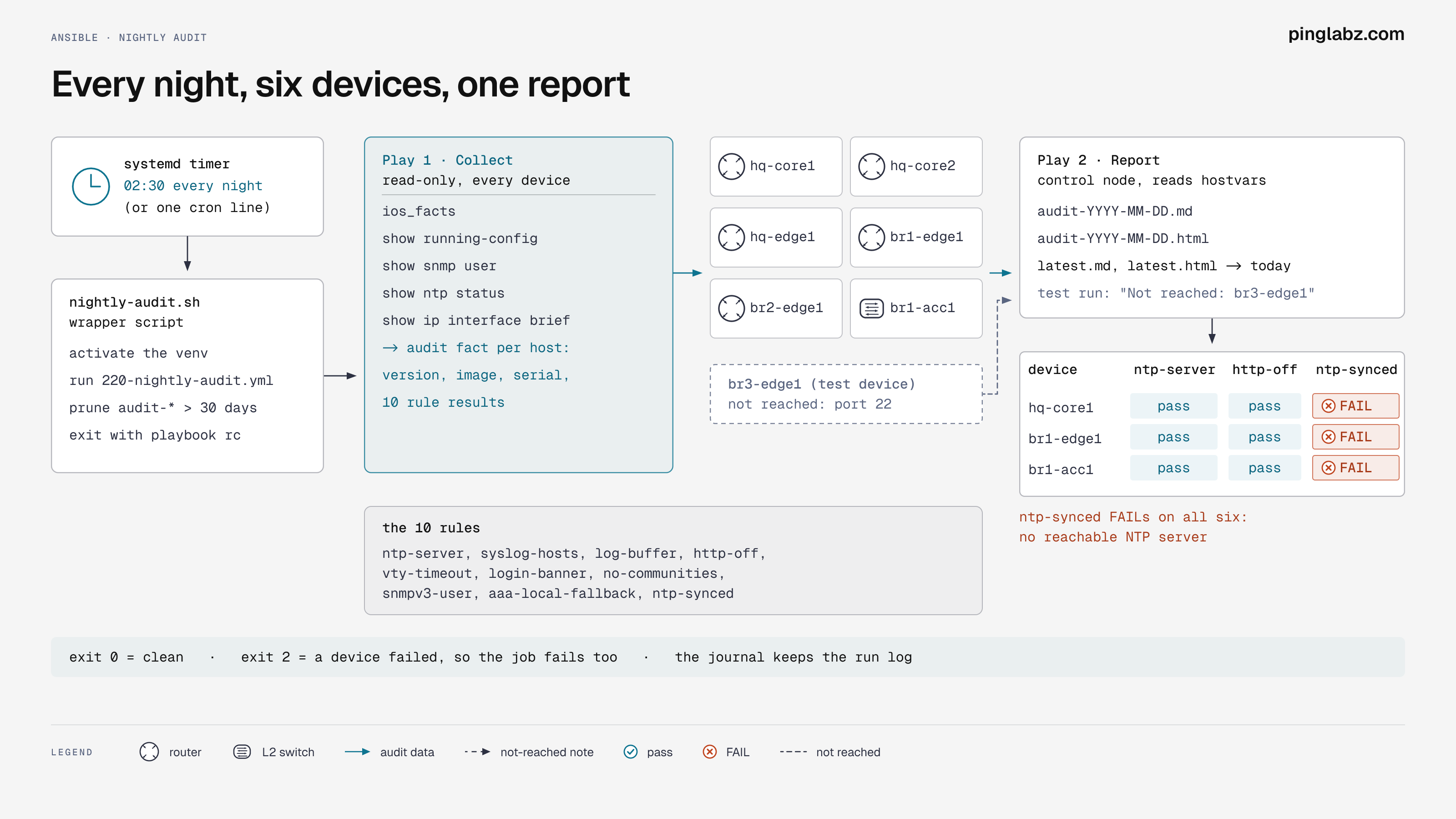](https://storage.ghost.io/c/ff/28/ff28db4a-11e1-4835-b928-158974cf96c1/content/images/2026/11/diagram-topology-11.png?ref=pinglabz.com)
The nightly audit as designed, with the systemd timer at 02:30\. In the lab I ran it by hand and removed the timer afterwards.
## The shape of it
Two plays in one playbook:
1. **Collect** runs against every device. It gathers facts, reads the running config and a few show commands, and evaluates the rules into a per-host `audit` fact. Nothing is written to the devices.
2. **Report** runs on the control node. It reads every host's `audit` fact through `hostvars` and renders two templates into `reports/audit/`, named by date, with a `latest` link.
Splitting it this way matters for the bad night. If a device can't be reached, it drops out of the first play, but the second play still runs and the report lists it as not reached. A report that silently skips a dead router is worse than no report.
## The playbook
```yaml
# playbooks/220-nightly-audit.yml
---
# Nightly audit: read-only. Collects facts and services compliance from every
# device and writes one dated report (Markdown + HTML) on the control node.
- name: Collect
hosts: sites
gather_facts: false
vars_files:
- ../vars/services.yml
vars:
snmp_level: "{{ svc_snmp_level | default('priv') }}"
tasks:
- name: Facts
cisco.ios.ios_facts:
gather_subset: default
- name: Read what the rules need
cisco.ios.ios_command:
commands:
- show running-config
- show snmp user
- show ntp status
- show ip interface brief
register: out
- name: Evaluate the rules
ansible.builtin.set_fact:
audit:
version: "{{ ansible_net_version }}"
image: "{{ ansible_net_image }}"
serial: "{{ ansible_net_serialnum | default('n/a') }}"
up_interfaces: "{{ out.stdout[3].splitlines() | select('search', '\\sup\\s+up\\s*$') | list | length }}"
rules:
- {rule: ntp-server, ok: "{{ cfg is search('^ntp server ' ~ ntp_server ~ '$', multiline=True) }}"}
- {rule: syslog-hosts, ok: "{{ ([syslog_server] + role_syslog_servers) | map('regex_replace', '^', 'logging host ') | reject('in', cfg_lines) | list | length == 0 }}"}
- {rule: log-buffer, ok: "{{ ('logging buffered ' ~ svc_logging_buffer ~ ' informational') in cfg_lines }}"}
- {rule: http-off, ok: "{{ cfg is not search('^ip http (secure-)?server$', multiline=True) }}"}
- {rule: vty-timeout, ok: "{{ cfg is search('^line vty 0 4\\n(?: .*\\n)*? exec-timeout ' ~ svc_vty_exec_timeout ~ ' 0$', multiline=True) }}"}
- {rule: login-banner, ok: "{{ cfg is search('^banner login ', multiline=True) }}"}
- {rule: no-communities, ok: "{{ cfg is not search('^snmp-server community ', multiline=True) }}"}
- {rule: snmpv3-user, ok: "{{ out.stdout[1] is search('User name: ' ~ svc_snmp_user ~ '$', multiline=True) }}"}
- {rule: aaa-local-fallback, ok: "{{ cfg is search('^aaa authentication login default group \\S+ local$', multiline=True) }}"}
- {rule: ntp-synced, ok: "{{ out.stdout[2] is search('Clock is synchronized') }}"}
vars:
cfg: "{{ out.stdout[0] }}"
cfg_lines: "{{ out.stdout[0].splitlines() }}"
- name: Report
hosts: localhost
gather_facts: false
vars:
run_date: "{{ now(utc=true).strftime('%Y-%m-%d') }}"
run_time: "{{ now(utc=true).strftime('%Y-%m-%d %H:%M UTC') }}"
report_dir: "{{ playbook_dir }}/../reports/audit"
devices: "{{ groups['sites'] | sort }}"
reached: "{{ devices | select('in', hostvars | dict2items | selectattr('value.audit', 'defined') | map(attribute='key') | list) | list }}"
tasks:
- name: Report folder
ansible.builtin.file:
path: "{{ report_dir }}"
state: directory
mode: "0755"
- name: Render Markdown and HTML
ansible.builtin.template:
src: "../templates/audit.{{ item }}.j2"
dest: "{{ report_dir }}/audit-{{ run_date }}.{{ item }}"
mode: "0644"
loop: [md, html]
- name: Point latest at today
ansible.builtin.file:
src: "audit-{{ run_date }}.{{ item }}"
dest: "{{ report_dir }}/latest.{{ item }}"
state: link
force: true
loop: [md, html]
- name: Summary
ansible.builtin.debug:
msg: "{{ reached | length }}/{{ devices | length }} devices reached, report {{ report_dir }}/audit-{{ run_date }}.html"
```
The rules are part 20's check, cut down to the ones that mean something every night. A few notes:
- `reached` is built from the hosts that actually have an `audit` fact, not from the inventory. That is how the report knows who is missing.
- The date comes from `now(utc=true)`, so the filename doesn't depend on the control node's timezone.
- Facts give version, image and serial for free. `ansible_net_model` came back empty on these images, so I used the image path instead of a model column.
## The templates
The Markdown version is the one I'd commit to Git or paste into a ticket:
```jinja
{# templates/audit.md.j2 #}
# Network audit {{ run_date }}
Run {{ run_time }}. Devices reached: {{ reached | length }} of {{ devices | length }}.
{% set missing = devices | difference(reached) %}
{% if missing %}Not reached: {{ missing | join(', ') }}
{% endif %}
## Inventory
| Device | Image | Version | Serial | Up interfaces | Rules failing |
|---|---|---|---|---|---|
{% for h in reached %}
{% set a = hostvars[h].audit %}
| {{ h }} | {{ a.image }} | {{ a.version }} | {{ a.serial }} | {{ a.up_interfaces }} | {{ a.rules | rejectattr('ok') | list | length }} |
{% endfor %}
## Failing rules
{% for h in reached %}
{% set bad = hostvars[h].audit.rules | rejectattr('ok') | map(attribute='rule') | list %}
- {{ h }}: {{ bad | join(', ') if bad else 'none' }}
{% endfor %}
```
The HTML version is one table with a column per rule, green for pass and red for fail. It has no external CSS or JavaScript, so it opens straight from a file share or an email attachment:
```jinja
{# templates/audit.html.j2 #}
Network audit {{ run_date }}
Network audit {{ run_date }}
Run {{ run_time }}. Devices reached: {{ reached | length }} of {{ devices | length }}.
{% set missing = devices | difference(reached) %}{% if missing %} Not reached: {{ missing | join(', ') }}{% endif %}
{% set rules = hostvars[reached[0]].audit.rules | map(attribute='rule') | list if reached else [] %}
| Device | Version | Serial | {% for r in rules %}{{ r }} | {% endfor %}
|---|
{% for h in reached %}{% set a = hostvars[h].audit %}
| {{ h }} | {{ a.version }} | {{ a.serial }} | {% for r in a.rules %}{{ 'pass' if r.ok else 'FAIL' }} | {% endfor %}
{% endfor %}
```
## First run
```text
$ ansible-playbook -i site-inv/hosts.yml playbooks/220-nightly-audit.yml
TASK [Summary]
ok: [localhost] => msg: 6/6 devices reached, report ~/ansible-lab/reports/audit/audit-2026-11-01.html
br1-acc1 : ok=3 changed=0 unreachable=0 failed=0
br1-edge1 : ok=3 changed=0 unreachable=0 failed=0
br2-edge1 : ok=3 changed=0 unreachable=0 failed=0
hq-core1 : ok=3 changed=0 unreachable=0 failed=0
hq-core2 : ok=3 changed=0 unreachable=0 failed=0
hq-edge1 : ok=3 changed=0 unreachable=0 failed=0
localhost : ok=4 changed=3 unreachable=0 failed=0
real 0m26.503s
```
Every device shows `changed=0`. The only changes are the report folder, the files and the links on the control node. About 26 seconds for six devices.
The Markdown it wrote:
```text
# Network audit 2026-11-01
Run 2026-11-01 04:32 UTC. Devices reached: 6 of 6.
## Inventory
| Device | Image | Version | Serial | Up interfaces | Rules failing |
|---|---|---|---|---|---|
| br1-acc1 | unix:/iol/iol.bin | 17.18.2 | 1 | 5 | 1 |
| br1-edge1 | unix:/iol/iol.bin | 17.18.2 | 2 | 4 | 1 |
| br2-edge1 | unix:/iol/iol.bin | 17.18.2 | 3 | 3 | 1 |
| hq-core1 | unix:/iol/iol.bin | 17.18.2 | 4 | 4 | 1 |
| hq-core2 | unix:/iol/iol.bin | 17.18.2 | 5 | 3 | 1 |
| hq-edge1 | unix:/iol/iol.bin | 17.18.2 | 6 | 5 | 1 |
## Failing rules
- br1-acc1: ntp-synced
- br1-edge1: ntp-synced
...
```
Two things to read honestly here. The serial numbers 1 to 6 are what the lab image reports; real hardware gives a proper serial, which is the column auditors usually ask for. And `ntp-synced` fails on every device because the lab has no reachable NTP server for the routers, the same result as in part 20\. The report is right to flag it. On a real network that line is the one that catches a broken time source before log timestamps stop lining up.
## The bad night: a device that doesn't answer
To test the missing-device path I added a second inventory file with a fake `br3-edge1` at an address nothing answers on, and ran the same playbook with both inventories:
```text
fatal: [br3-edge1]: FAILED! => {"changed": false, "msg": "[Errno None] Unable to connect to port 22 on 10.66.10.99"}
"msg": "6/7 devices reached, report ~/ansible-lab/reports/audit/audit-2026-11-01.html"
br3-edge1 : ok=0 changed=0 unreachable=0 failed=1
localhost : ok=4 changed=1 unreachable=0 failed=0
exit=2
```
And the top of the report:
```text
Run 2026-11-01 04:32 UTC. Devices reached: 6 of 7.
Not reached: br3-edge1
```
The report still got written, it names the device, and `ansible-playbook` exits 2\. That exit code is what the scheduler sees, so a failed night shows up as a failed job too. I removed the fake inventory afterwards and re-ran so the day's report is the clean six-device one.
## Scheduling it
There are two normal ways to run this every night on a Linux control node: a cron entry or a systemd timer. Either way, wrap the run in a small script so the schedule line stays short and the environment is explicit:
```bash
# bin/nightly-audit.sh
#!/usr/bin/env bash
# Run the nightly audit and keep 30 days of reports.
set -u
cd "$HOME/ansible-lab"
. "$HOME/ansible-venv/bin/activate"
export ANSIBLE_DEPRECATION_WARNINGS=False ANSIBLE_NOCOLOR=1
ansible-playbook -i site-inv/hosts.yml playbooks/220-nightly-audit.yml
rc=$?
find reports/audit -name 'audit-*' -mtime +30 -delete
echo "audit exit code $rc"
exit $rc
```
The `find ... -mtime +30 -delete` keeps a month of reports. Without it the folder grows forever. The `latest` links aren't matched by `audit-*`, so they stay.
With cron, it is one line in `crontab -e`:
```text
30 2 * * * $HOME/ansible-lab/bin/nightly-audit.sh >> $HOME/ansible-lab/reports/audit/cron.log 2>&1
```
I didn't install that one. I used a systemd user timer instead, because it logs to the journal, shows the last result in `systemctl status`, and can catch up on a missed run. Two unit files in `~/.config/systemd/user/`:
```ini
# nightly-audit.service
[Unit]
Description=Nightly network audit (Ansible)
[Service]
Type=oneshot
ExecStart=%h/ansible-lab/bin/nightly-audit.sh
```
```ini
# nightly-audit.timer
[Unit]
Description=Run the network audit every night
[Timer]
OnCalendar=*-*-* 02:30:00
Persistent=true
RandomizedDelaySec=300
[Install]
WantedBy=timers.target
```
`Persistent=true` runs a missed job at the next boot, and `RandomizedDelaySec` spreads the start over five minutes so several audits don't all hit the devices at 02:30 sharp. Enabling it and checking the schedule:
```text
$ systemd-analyze calendar "*-*-* 02:30:00"
Normalized form: *-*-* 02:30:00
Next elapse: Mon 2026-11-02 02:30:00 UTC
$ systemctl --user enable --now nightly-audit.timer
$ systemctl --user list-timers nightly-audit.timer
NEXT LEFT LAST PASSED UNIT ACTIVATES
Mon 2026-11-02 02:32:59 UTC 22h - - nightly-audit.timer nightly-audit.service
```
The 02:32:59 is the random delay at work. I didn't wait 22 hours to watch it fire. Instead I started the service by hand, which runs exactly what the timer would:
```text
$ systemctl --user start nightly-audit.service
$ systemctl --user status nightly-audit.service
○ nightly-audit.service - Nightly network audit (Ansible)
Active: inactive (dead) since Sun 2026-11-01 04:33:00 UTC
TriggeredBy: ● nightly-audit.timer
Process: 700028 ExecStart=.../ansible-lab/bin/nightly-audit.sh (code=exited, status=0/SUCCESS)
$ journalctl --user -u nightly-audit.service -o cat
"msg": "6/6 devices reached, report ~/ansible-lab/reports/audit/audit-2026-11-01.html"
audit exit code 0
Finished nightly-audit.service - Nightly network audit (Ansible).
```
That proves the job runs under systemd with its own environment, which is the usual place these break: a missing venv, a vault password file the service can't read, or SSH host keys that only exist for your interactive shell. It worked here because the vault password file and `known_hosts` are in the same user's home.
What it does not prove is that the timer fired at 02:30 on its own. I didn't see that happen, so I'm not showing it.
One more catch. A user timer only runs while that user has a systemd session, and this account showed:
```text
Linger=no
```
With linger off, the timer stops when you log out. For a real control node, either run `loginctl enable-linger ` or install the units as system units with `User=` set. I didn't change it in the lab.
## What I left running
Nothing. The lab doesn't need a nightly audit, so after the manual run I removed the schedule:
```text
$ systemctl --user disable --now nightly-audit.timer
Removed '.../timers.target.wants/nightly-audit.timer'.
$ rm ~/.config/systemd/user/nightly-audit.service ~/.config/systemd/user/nightly-audit.timer
$ systemctl --user daemon-reload
$ systemctl --user list-timers --all | grep -c nightly
0
$ crontab -l
no crontab for j
```
The playbook, templates, wrapper script and the day's report stay in the project. Putting the schedule back is two files and one `enable --now`.
## Where to take it
- Commit `latest.md` to Git each night so the diff between two days shows exactly what changed. That is where the series goes next.
- Have the wrapper send the HTML, or a link to it, only when the exit code isn't 0 or a rule count goes up. A daily email nobody reads trains everyone to ignore it.
- Add part 21's pre-check snapshot (interfaces, OSPF, BGP, routes) as a second section, and compare it with the previous night's.
[Part 23](https://www.pinglabz.com/ansible-network-facts-inventory/) builds a network inventory from facts and parsed show output: interfaces, CDP neighbors, OSPF and BGP state. The rest of the series is on the [series page](https://www.pinglabz.com/ansible-network-automation/).